Lite LLM Gateway API Documentation (BETA)
🚀 This is the BETA version of the Lite LLM Gateway API.
This service is powered by LiteLLM-Proxy, a unified interface for 100+ LLMs. The API is currently in beta testing and may undergo changes. While the service is production-ready and stable, some features and endpoints may be updated based on user feedback. Please report any issues to kadalsupport@learningmate.com.
Key Points:
- All endpoints are fully functional and ready for use
- Breaking changes will be communicated in advance
- New features and improvements are actively being added
- Feedback and feature requests are welcome
Table of Contents
- Introduction
- How to Find Your LM-Key 🔑
- Providers and Models
- Authentication
- API Endpoints
- Guardrails
- Additional Configuration
- Code Examples
- Responses
Introduction
The Lite LLM Gateway BETA is a production-ready service built on LiteLLM-Proxy, providing multi-tenant, authenticated, rate-limited access to various Large Language Models. LiteLLM is a unified interface that simplifies calling 100+ LLM APIs using the OpenAI format. This proxy supports text generation, multimodal capabilities, image generation, speech-to-text transcription, and embedding generation.
Key Features
- Multi-tenant Authentication: JWT tokens and API key validation
- Rate Limiting: Redis-based per-tenant rate limiting
- Quota Management: Monthly token and cost limit enforcement
- Guardrails: Input/output content filtering with PII detection and prompt injection prevention (enabled by default)
- Comprehensive Metering: Full request telemetry captured to MongoDB
- Streaming Support: Server-Sent Events (SSE) for chat completions
- OpenAI-Compatible API: Drop-in replacement for OpenAI API endpoints
Base URL
Production: https://api.kadal.ai/llm_gateway/api/v1
Development: http://localhost:8080/llm_gateway/api/v1
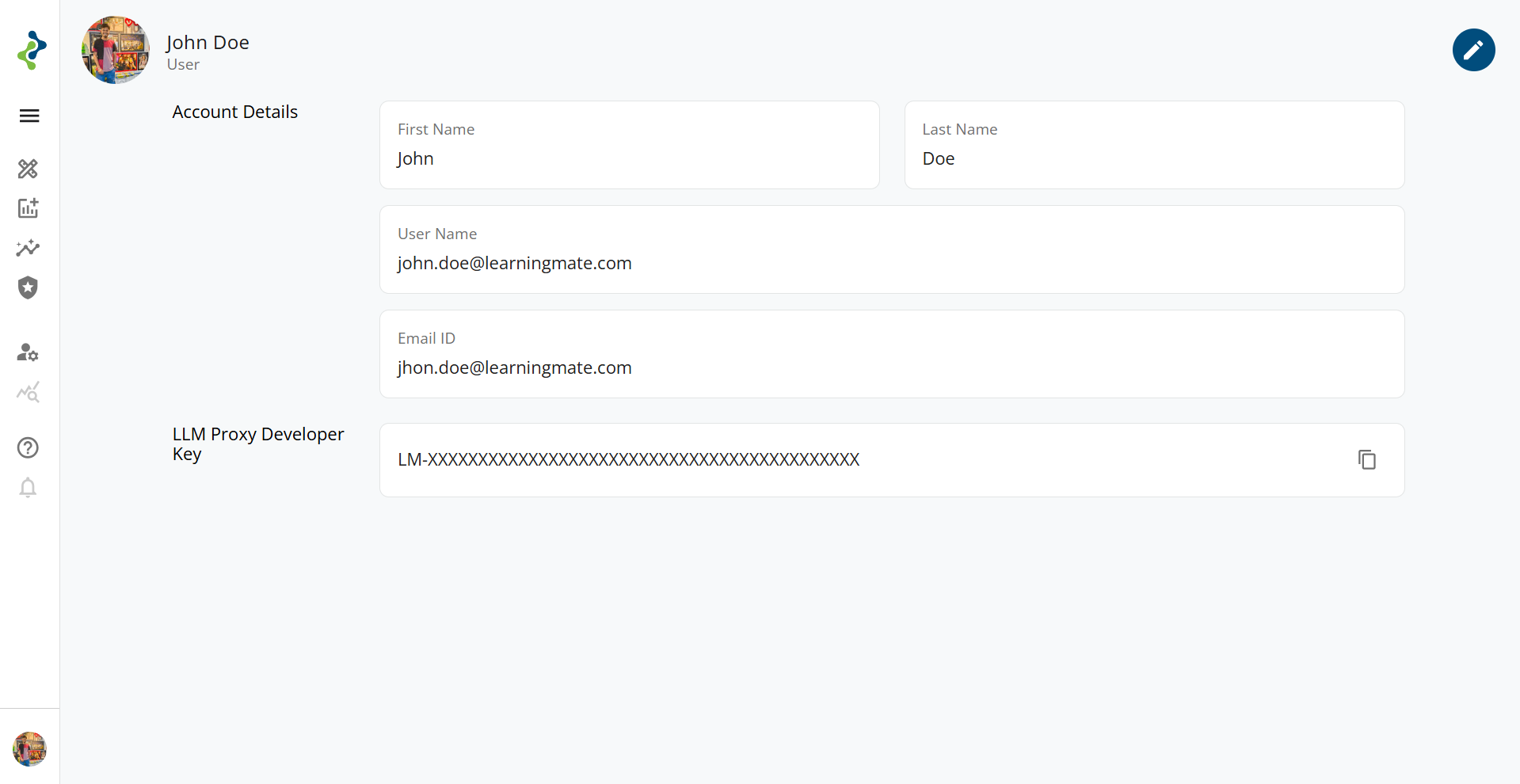
How to Find Your LM-Key 🔑
To access the kadal.ai APIs, you need an API key known as the LM-Key. This key uniquely identifies your account and is required to authenticate API requests.
Steps to Retrieve Your LM-Key
Login to kadal.ai
Go to https://kadal.ai and log in using your registered email and password.Navigate to Profile
Click on your avatar located on the bottom-left corner of the screen to open the profile menu.Copy the LM-Key
On the Profile page, you'll see a field labeled LM-Key. Click the copy icon next to it to copy your API key.
⚠️ Important Notes
- Keep your LM-Key secret and secure.
- Do not share your LM-Key publicly or commit it to version control.
Providers and Models
The Lite LLM Gateway BETA supports the same comprehensive pool of models as the main gateway:
Azure OpenAI
| Models | Context Length | Price (M Tokens) | Active / Deprecated | Model Support |
|---|---|---|---|---|
| gpt-5.1 New | 400K | Input: $1.25, Output: $10.000 | Active | text, image |
| gpt-5 New | 400K | Input: $1.250, Output: $10.000 | Active | text, image |
| gpt-5-mini New | 400K | Input: $0.250, Output: $2.000 | Active | text, image |
| gpt-5-nano New | 400K | Input: $0.050, Output: $0.400 | Active | text, image |
| gpt-4.1 New | 1,047K | Input: $2.00, Output: $8.00 | Active | text, image |
| gpt-4.1-mini New | 1,047K | Input: $0.40, Output: $1.60 | Active | text, image |
| gpt-4.1-nano New | 1,047K | Input: $0.10, Output: $0.40 | Active | text, image |
| o3 | 200K | Input: $2, Output: $8 | Active | text, image |
| o3-mini | 200K | Input: $1.10, Output: $4.40 | Active | text |
| gpt-4o | 128K | Input: $2.75, Output: $11 | Active | text, image |
| o1-mini | 128K | Input: $3.30, Output: $13.20 | Active | text, image |
| o1 | 200K | Input: $16.50, Output: $66 | Active | text, image |
| gpt-image-1 New | -- | Input: $5, Output: $40 | Active | text, image |
| gpt-image-1-mini New | -- | Input: $2, Output: $8 | Active | text, image |
Vertex AI
| Models | Context Length | Price (M Tokens) | Active / Deprecated | Model Support |
|---|---|---|---|---|
| gemini-3-pro-image-preview New | Max input tokens: 1,048,576 Max output tokens: 65,535 | Input: $2, Output: $12, Image Output: $120 | Active | text, image |
| gemini-2.5-flash-lite New | Max input tokens: 1,048,576 Max output tokens: 65,535 | Input: $0.1, Output: $0.4 | Active | text, image |
| gemini-2.5-flash-image New | Max input tokens: 1,048,576 Max output tokens: 65,535 | Input: $2.5, Output: $15, Image Output: $30 | Active | text, image |
| gemini-2.5-flash | Max input tokens: 1,048,576 Max output tokens: 65,535 | Input: $0.30, Output: $2.50 | Active | text, image |
| gemini-2.5-pro | Max input tokens: 1,048,576 Max output tokens: 65,535 | Input: $2.5, Output: $15 | Active | text, image |
| gemini-2.0-flash | Max input tokens: 1,048,576 Max output tokens: 8,192 | Input: $0.15, Output: $0.60 char | Active | text, image |
| gemini-2.0-flash-lite | Max input tokens: 1,048,576 Max output tokens: 8,192 | Input: $0.075, Output: $0.30 | Active | text, image |
| imagen-4.0-generate-001 New | --- | Output: $0.004 per Image | Active | text |
| imagen-4.0-fast-generate-001 New | --- | Output: $0.002 per Image | Active | text |
| imagen-3.0-generate-001 New | --- | Output: $0.004 per Image | Active | text |
| imagen-3.0-fast-generate-001 New | --- | Output: $0.002 per Image | Active | text |
AWS Bedrock
OpenAI
| Models | Context Length | Price (k Tokens) | Active / Deprecated | Model Support |
|---|---|---|---|---|
| openai.gpt-oss-120b-1:0 New | 131k | Input: $0.00015, Output: $0.0006 | Active | text |
| openai.gpt-oss-20b-1:0 New | 131k | Input: $0.00007, Output: $0.0003 | Active | text |
Llama
| Models | Context Length | Price (k Tokens) | Active / Deprecated | Model Support |
|---|---|---|---|---|
| us.meta.llama4-maverick-17b-instruct-v1:0 New | 128k | Input: $0.00024, Output: $0.00097 | Active | text, image |
| us.meta.llama4-scout-17b-instruct-v1:0 New | 128k | Input: $0.00017, Output: $0.00066 | Active | text, image |
Nova
| Models | Context Length | Price (k Tokens) | Active / Deprecated | Model Support |
|---|---|---|---|---|
| us.amazon.nova-micro-v1:0 | 128k | Input: $0.000035, Output: $0.00014 | Active | text |
| us.amazon.nova-lite-v1:0 | 300k | Input: $0.00006, Output: $0.00024 | Active | text, image, Docs, Video |
| us.amazon.nova-pro-v1:0 | 300k | Input: $0.0008, Output: $0.0032 | Active | text, image, Docs, Video |
Authentication
The Lite LLM Gateway BETA supports two authentication methods:
Option 1: Bearer Token (JWT)
curl -H "Authorization: Bearer <your_lm_key>" ...
Option 2: API Key Header
curl -H "X-API-Key: <your_lm_key>" ...
Note: Use your LM-Key as the token for authentication.
API Endpoints
Chat Completions
Create chat completions for the provided messages.
- Endpoint:
POST /llm_gateway/api/v1/chat/completions - Authentication: Required (Bearer token or API key)
Request Parameters
| Parameter | Type | Required | Description |
|---|---|---|---|
| model | string | Yes | Model ID to use (e.g., "gpt-4o-mini") |
| messages | array | Yes | List of messages in the conversation |
| temperature | number | No | Sampling temperature (0-2) |
| max_tokens | integer | No | Maximum tokens to generate |
| stream | boolean | No | Enable streaming response |
| stream_options | object | No | Streaming options (e.g., include_usage) |
Example Request
{
  "model": "gpt-4o-mini",
  "messages": [
    {"role": "system", "content": "You are a helpful assistant."},
    {"role": "user", "content": "Hello!"}
  ],
  "temperature": 0.7
}
Embeddings
Create embedding vectors representing the input text.
- Endpoint:
POST /llm_gateway/api/v1/embeddings - Authentication: Required (Bearer token or API key)
Request Parameters
| Parameter | Type | Required | Description |
|---|---|---|---|
| model | string | Yes | Model ID to use (e.g., "text-embedding-ada-002") |
| input | string or array | Yes | Text or array of texts to embed |
| encoding_format | string | No | Format for embeddings (float or base64) |
Example Request
{
  "model": "text-embedding-ada-002",
  "input": "Hello, world!"
}
Image Generation
Create images from text prompts.
- Endpoint:
POST /llm_gateway/api/v1/images/generations - Authentication: Required (Bearer token or API key)
Request Parameters
| Parameter | Type | Required | Description |
|---|---|---|---|
| model | string | No | Model ID (defaults to "imagen-4.0-generate-001") |
| prompt | string | Yes | Text description of desired image |
| n | integer | No | Number of images to generate (1-10) |
| size | string | No | Image size (e.g., "1024x1024") |
| quality | string | No | Quality level: "standard" or "hd" |
| response_format | string | No | "url" or "b64_json" |
Example Request
{
  "model": "imagen-4.0-generate-001",
  "prompt": "A beautiful sunset over mountains",
  "size": "1024x1024",
  "quality": "standard",
  "n": 1
}
Audio Transcription
Transcribe audio files to text.
- Endpoint:
POST /llm_gateway/api/v1/audio/transcriptions - Authentication: Required (Bearer token or API key)
- Content-Type: multipart/form-data
Request Parameters
| Parameter | Type | Required | Description |
|---|---|---|---|
| file | file | Yes | Audio file to transcribe |
| model | string | Yes | Model ID (e.g., "whisper-1") |
| language | string | No | Language code (ISO-639-1) |
| prompt | string | No | Optional text to guide the model |
| response_format | string | No | Format: json, text, srt, vtt, verbose_json |
| temperature | number | No | Sampling temperature (0-1) |
Supported formats: flac, mp3, mp4, mpeg, mpga, m4a, ogg, wav, webm
Maximum file size: 25 MB
Guardrails
Guardrails are ENABLED by default to protect against malicious inputs and outputs.
Input Guardrails (Pre-processing)
| Rule | Type | Action | Severity |
|---|---|---|---|
| Prompt Injection | PROMPT_INJECTION | BLOCK | Critical |
| SSN Detection | PII_DETECTION | BLOCK | High |
| Credit Card Detection | PII_DETECTION | BLOCK | High |
| Email Detection | PII_DETECTION | WARN | Medium |
| Phone Detection | PII_DETECTION | WARN | Medium |
| Content Safety | CONTENT_SAFETY | BLOCK | Critical |
| API Key Detection | SENSITIVE_DATA | BLOCK | High |
Output Guardrails (Post-processing)
| Rule | Type | Action | Severity |
|---|---|---|---|
| Toxic Content | TOXIC_CONTENT | BLOCK | High |
| Code Injection | CODE_INJECTION | WARN | Medium |
| PII Leakage | PII_DETECTION | WARN | High |
Additional Configuration
You can pass additional metadata using custom HTTP headers with x- prefix to customize behavior, enable metering, and provide context for your API requests.
Available Configuration Headers
| Header Name | Type | Description | Example |
|---|---|---|---|
x-bot-id | string | Unique identifier for the bot | your-bot-id-here |
x-llm-source | string | Source system identifier | Kadal |
x-llm-category | string | LLM operation category | chat, embeddings, image |
x-llm-sub-category | string | Sub-category of operation | Agent, RAG, Search |
x-query-id | string | Unique query identifier | your-query-id-here |
x-app-name | string | Application name | test, DSPY |
x-session-id | string | Session identifier | your-session-id-here |
x-user-id | string | User identifier | your-user-id-here |
x-keycloak-user-id | string | Keycloak user ID | your-keycloak-user-id |
x-is-system | string | System-generated request flag | true, false |
x-use-guard | string | Guardrails mode | 0 (off), 1 (default), 2 (strict) |
x-is-cache | string | Enable/disable caching | 0 (disabled), 1 (enabled) |
Complete Header Example
import requests

url = "https://api.kadal.ai/llm_gateway/api/v1/chat/completions"
lm_key = "YOUR_LM_KEY"

headers = {
    "Authorization": f"Bearer {lm_key}",
    "Content-Type": "application/json",
    "x-bot-id": "your-bot-id-here",
    "x-llm-source": "Kadal",
    "x-llm-category": "chat",
    "x-llm-sub-category": "Agent",
    "x-query-id": "your-query-id-here",
    "x-app-name": "test",
    "x-session-id": "your-session-id-here",
    "x-user-id": "your-user-id-here",
    "x-is-system": "true",
    "x-use-guard": "1",
    "x-is-cache": "1"
}

payload = {
    "model": "gpt-4o-mini",
    "messages": [
        {"role": "user", "content": "Hello!"}
    ]
}

response = requests.post(url, headers=headers, json=payload)
print(response.json())
cURL Example with All Headers
curl --location 'https://api.kadal.ai/llm_gateway/api/v1/chat/completions' \
--header 'accept: application/json' \
--header 'Authorization: Bearer YOUR_LM_KEY' \
--header 'Content-Type: application/json' \
--header 'x-bot-id: your-bot-id-here' \
--header 'x-llm-source: Kadal' \
--header 'x-llm-category: chat' \
--header 'x-llm-sub-category: Agent' \
--header 'x-query-id: your-query-id-here' \
--header 'x-app-name: test' \
--header 'x-session-id: your-session-id-here' \
--header 'x-user-id: your-user-id-here' \
--header 'x-keycloak-user-id: your-keycloak-user-id' \
--header 'x-is-system: true' \
--data '{
  "model": "gemini-2.5-pro",
  "messages": [
    {
      "role": "user",
      "content": "Hello, how are you?"
    }
  ],
  "temperature": 0.5,
  "max_tokens": 4096
}'
Code Examples
Chat Completions
Basic Example
import requests

url = "https://api.kadal.ai/llm_gateway/api/v1/chat/completions"
lm_key = "YOUR_LM_KEY"

headers = {
    "Authorization": f"Bearer {lm_key}",
    "Content-Type": "application/json"
}

payload = {
    "model": "gpt-4o-mini",
    "messages": [
        {"role": "system", "content": "You are a helpful assistant."},
        {"role": "user", "content": "What is the capital of France?"}
    ],
    "temperature": 0.7,
    "max_tokens": 150
}

response = requests.post(url, headers=headers, json=payload)
print(response.json())
With Additional Headers
import requests

url = "https://api.kadal.ai/llm_gateway/api/v1/chat/completions"
lm_key = "YOUR_LM_KEY"

headers = {
    "Authorization": f"Bearer {lm_key}",
    "Content-Type": "application/json",
    "x-bot-id": "your-bot-id-here",
    "x-llm-source": "Kadal",
    "x-llm-category": "chat",
    "x-query-id": "unique-query-id-123",
    "x-app-name": "MyApp",
    "x-use-guard": "2",  # Strict guardrails
    "x-is-cache": "0"    # Disable caching
}

payload = {
    "model": "gpt-4o-mini",
    "messages": [
        {"role": "system", "content": "You are a helpful assistant."},
        {"role": "user", "content": "What is the capital of France?"}
    ],
    "temperature": 0.7,
    "max_tokens": 150
}

response = requests.post(url, headers=headers, json=payload)
print(response.json())
Streaming Chat Completions
import requests

url = "https://api.kadal.ai/llm_gateway/api/v1/chat/completions"
lm_key = "YOUR_LM_KEY"

headers = {
    "Authorization": f"Bearer {lm_key}",
    "Content-Type": "application/json",
    "x-is-cache": "0",  # Disable caching for streaming
    "x-session-id": "session-123"
}

payload = {
    "model": "gpt-4o-mini",
    "messages": [
        {"role": "user", "content": "Tell me a story about a robot."}
    ],
    "stream": True,
    "stream_options": {"include_usage": True}
}

response = requests.post(url, headers=headers, json=payload, stream=True)

for line in response.iter_lines():
    if line:
        print(line.decode('utf-8'))
Embeddings
Basic Example
import requests

url = "https://api.kadal.ai/llm_gateway/api/v1/embeddings"
lm_key = "YOUR_LM_KEY"

headers = {
    "X-API-Key": lm_key,
    "Content-Type": "application/json"
}

payload = {
    "model": "text-embedding-ada-002",
    "input": "The quick brown fox jumps over the lazy dog"
}

response = requests.post(url, headers=headers, json=payload)
print(response.json())
With Additional Headers
import requests

url = "https://api.kadal.ai/llm_gateway/api/v1/embeddings"
lm_key = "YOUR_LM_KEY"

headers = {
    "X-API-Key": lm_key,
    "Content-Type": "application/json",
    "x-bot-id": "your-bot-id-here",
    "x-user-id": "100",
    "x-llm-category": "embeddings",
    "x-is-cache": "1",   # Enable caching
    "x-use-guard": "0"   # Disable guardrails for embeddings
}

payload = {
    "model": "text-embedding-ada-002",
    "input": "The quick brown fox jumps over the lazy dog"
}

response = requests.post(url, headers=headers, json=payload)
print(response.json())
Image Generation
Basic Example
import requests

url = "https://api.kadal.ai/llm_gateway/api/v1/images/generations"
lm_key = "YOUR_LM_KEY"

headers = {
    "Authorization": f"Bearer {lm_key}",
    "Content-Type": "application/json"
}

payload = {
    "model": "imagen-4.0-generate-001",
    "prompt": "A futuristic city with flying cars at sunset",
    "size": "1024x1024",
    "quality": "standard",
    "n": 1
}

response = requests.post(url, headers=headers, json=payload)
print(response.json())
With Input Guardrails
import requests

url = "https://api.kadal.ai/llm_gateway/api/v1/images/generations"
lm_key = "YOUR_LM_KEY"

headers = {
    "Authorization": f"Bearer {lm_key}",
    "Content-Type": "application/json",
    "x-llm-category": "image",
    "x-use-guard": "2",  # Strict guardrails
    "x-is-cache": "0",   # Disable caching
    "x-query-id": "img-gen-123"
}

payload = {
    "model": "imagen-4.0-generate-001",
    "prompt": "A futuristic city with flying cars at sunset",
    "size": "1024x1024",
    "quality": "standard",
    "n": 1
}

response = requests.post(url, headers=headers, json=payload)
print(response.json())
Audio Transcription
Basic Example
import requests

url = "https://api.kadal.ai/llm_gateway/api/v1/audio/transcriptions"
lm_key = "YOUR_LM_KEY"

headers = {
    "Authorization": f"Bearer {lm_key}"
}

with open("audio.mp3", "rb") as audio_file:
    files = {
        "file": audio_file,
    }
    data = {
        "model": "whisper-1",
        "response_format": "json"
    }

    response = requests.post(url, headers=headers, files=files, data=data)
    print(response.json())
With Additional Headers
import requests

url = "https://api.kadal.ai/llm_gateway/api/v1/audio/transcriptions"
lm_key = "YOUR_LM_KEY"

headers = {
    "Authorization": f"Bearer {lm_key}",
    "x-bot-id": "your-bot-id-here",
    "x-query-id": "24",
    "x-llm-category": "audio",
    "x-use-guard": "1",  # Enable guardrails
    "x-is-cache": "1"    # Enable caching
}

with open("audio.mp3", "rb") as audio_file:
    files = {
        "file": audio_file,
    }
    data = {
        "model": "whisper-1",
        "response_format": "json"
    }

    response = requests.post(url, headers=headers, files=files, data=data)
    print(response.json())
cURL Examples
Chat Completions
curl -X POST "https://api.kadal.ai/llm_gateway/api/v1/chat/completions" \
  -H "Authorization: Bearer YOUR_LM_KEY" \
  -H "Content-Type: application/json" \
  -H "x-bot-id: your-bot-id-here" \
  -H "x-llm-source: Kadal" \
  -H "x-llm-category: chat" \
  -H "x-query-id: unique-query-id" \
  -d '{
    "model": "gpt-4o-mini",
    "messages": [
      {"role": "user", "content": "Hello, how are you?"}
    ]
  }'
Embeddings
curl -X POST "https://api.kadal.ai/llm_gateway/api/v1/embeddings" \
  -H "X-API-Key: YOUR_LM_KEY" \
  -H "Content-Type: application/json" \
  -H "x-llm-category: embeddings" \
  -H "x-is-cache: 1" \
  -d '{
    "model": "text-embedding-ada-002",
    "input": "Sample text to embed"
  }'
Image Generation
curl -X POST "https://api.kadal.ai/llm_gateway/api/v1/images/generations" \
  -H "Authorization: Bearer YOUR_LM_KEY" \
  -H "Content-Type: application/json" \
  -H "x-llm-category: image" \
  -H "x-use-guard: 2" \
  -d '{
    "model": "imagen-4.0-generate-001",
    "prompt": "A serene mountain landscape",
    "size": "1024x1024"
  }'
Audio Transcription
curl -X POST "https://api.kadal.ai/llm_gateway/api/v1/audio/transcriptions" \
  -H "Authorization: Bearer YOUR_LM_KEY" \
  -H "x-llm-category: audio" \
  -H "x-query-id: audio-query-123" \
  -F "file=@audio.mp3" \
  -F "model=whisper-1" \
  -F "response_format=json"
Tool Calling / Function Calling
The Lite LLM Gateway supports OpenAI-compatible function calling, allowing models to use external tools and functions.
Python Example
import requests

url = "https://api.kadal.ai/llm_gateway/api/v1/chat/completions"
lm_key = "YOUR_LM_KEY"

headers = {
    "Authorization": f"Bearer {lm_key}",
    "Content-Type": "application/json",
    "x-bot-id": "your-bot-id",
    "x-llm-source": "Kadal",
    "x-llm-category": "chat",
    "x-llm-sub-category": "Agent",
    "x-app-name": "test"
}

payload = {
    "model": "gemini-2.5-pro",
    "messages": [
        {
            "role": "system",
            "content": "You are a helpful assistant with access to tools."
        },
        {
            "role": "user",
            "content": "How many words are in this sentence: Hello world this is a test?"
        }
    ],
    "temperature": 0.5,
    "max_tokens": 4096,
    "top_p": 1.0,
    "frequency_penalty": 1.0,
    "presence_penalty": 1.0,
    "tools": [
        {
            "type": "function",
            "function": {
                "name": "word_count",
                "description": "Use this tool to count the number of words in a given text, only if explicitly requested for a word count.",
                "parameters": {
                    "type": "object",
                    "properties": {
                        "text": {
                            "type": "string",
                            "description": "Input text."
                        }
                    },
                    "required": ["text"]
                },
                "returns": {
                    "type": "integer",
                    "description": "Number of words."
                }
            }
        }
    ],
    "tool_choice": "auto",
    "stream": False
}

response = requests.post(url, headers=headers, json=payload)
print(response.json())
cURL Example
curl --location 'https://api.kadal.ai/llm_gateway/api/v1/chat/completions' \
--header 'accept: application/json' \
--header 'Authorization: Bearer YOUR_LM_KEY' \
--header 'Content-Type: application/json' \
--header 'x-bot-id: your-bot-id' \
--header 'x-llm-source: Kadal' \
--header 'x-llm-category: chat' \
--header 'x-llm-sub-category: Agent' \
--header 'x-query-id: unique-query-id' \
--header 'x-app-name: test' \
--header 'x-session-id: unique-session-id' \
--header 'x-user-id: unique-user-id' \
--header 'x-keycloak-user-id: keycloak-user-id' \
--header 'x-is-system: true' \
--data '{
  "model": "gemini-2.5-pro",
  "messages": [
    {
      "role": "system",
      "content": "You are a helpful assistant with access to tools."
    },
    {
      "role": "user",
      "content": "How many words are in this sentence?"
    }
  ],
  "temperature": 0.5,
  "max_tokens": 4096,
  "top_p": 1.0,
  "frequency_penalty": 1.0,
  "presence_penalty": 1.0,
  "tools": [
    {
      "type": "function",
      "function": {
        "name": "word_count",
        "description": "Use this tool to count the number of words in a given text, only if explicitly requested for a word count. returns: int: Number of words.",
        "parameters": {
          "type": "object",
          "properties": {
            "text": {
              "type": "string",
              "description": "Input text."
            }
          },
          "required": [
            "text"
          ]
        },
        "returns": {
          "type": "integer",
          "description": "int: Number of words."
        }
      }
    }
  ],
  "tool_choice": "auto",
  "stream": false
}'
Responses
HTTP Status Codes
| Status Code | Description | Content-Type |
|---|---|---|
| 200 | Successful | application/json |
| 400 | Bad Request | application/json |
| 401 | Unauthorized | application/json |
| 403 | Forbidden - Quota/Rate Limit | application/json |
| 429 | Too Many Requests | application/json |
| 502 | Bad Gateway | application/json |
| 504 | Gateway Timeout | application/json |
| 500 | Internal Server Error | application/json |
Success Response Example (Chat)
{
  "id": "chatcmpl-abc123",
  "object": "chat.completion",
  "created": 1677858242,
  "model": "gpt-4o-mini",
  "choices": [
    {
      "index": 0,
      "message": {
        "role": "assistant",
        "content": "Hello! How can I assist you today?"
      },
      "finish_reason": "stop"
    }
  ],
  "usage": {
    "prompt_tokens": 12,
    "completion_tokens": 9,
    "total_tokens": 21
  }
}
Error Response Example
{
  "error": {
    "type": "invalid_request_error",
    "message": "Model 'gpt-5' not found",
    "code": "model_not_found"
  }
}
Guardrail Blocked Response
{
  "error": {
    "type": "guardrail_error",
    "message": "Request blocked by guardrails: Potential prompt injection detected",
    "code": "guardrail_blocked"
  }
}
📞 Contact Us
If you have any questions, feedback, or need support, feel free to reach out to us:
Thank you for working with us!